
Looking up the modbus poll price before you buy? As of November 2026, Witte Software lists Modbus Poll at USD 129 for one or two perpetual single-user licences, with volume steps down to USD 109. That buys a mature Windows master with TCP, TLS, UDP and Excel OLE. If most of your work is RS-485 RTU or ASCII, a free browser tool such as ModbusMate covers the same daily polling jobs without a licence fee.
ModbusPricingLicenceRS-485Free ToolWindows
Short answer: For RS-485 RTU/ASCII testing, ModbusMate does the daily jobs for free. Modbus Poll is worth its USD 129 if you need TCP/UDP/TLS, Excel OLE automation or vendor support with a licence.
Modbus Poll vs ModbusMate at a glance
The table below maps the published Modbus Poll offer to what ModbusMate does today. Poll figures come from the official order and download pages as of November 2026; Mate details come from the current product.
| Feature | Modbus Poll (as of November 2026) | ModbusMate |
|---|---|---|
| Price | USD 129 (1–2 licences); USD 119 (3–9); USD 109 (10+) | Free; free profile after 5 minutes of guest use |
| Licence model | Perpetual single-user; one person, any number of PCs | No licence fee |
| Platforms | Windows 7–11 (x86, x64, ARM64) | Chrome, Edge or Opera on Windows, macOS, Linux, ChromeOS |
| Install | Windows installer | Nothing to install; runs in the browser |
| Serial RTU/ASCII | Yes | Yes (Web Serial) |
| Modbus TCP | Yes | Coming soon |
| TLS / UDP | TCP Security (TLS), UDP, RTU/ASCII over TCP/UDP | Coming soon with TCP |
| Logging / export | Text file or direct to Excel | Poll log to CSV or XLSX |
| OLE / Excel automation | Yes (VBA) | No |
| Support | Unlimited support and maintenance per order page | In-app feedback; product page docs |
| Trial limits | 10 minutes from connection; after 30 days cannot connect | No connection timer once you have a profile |
Trademarks belong to their owners. Modbus Poll pricing from modbustools.com/order.html; trial limits from the official download page.
Side by side: the same holding-register job
Both tools can read ten holding registers from slave 1 at a one-second scan rate. In Modbus Poll you open a document window, set the Read/Write Definition, and connect over a COM port. In ModbusMate you pick Web Serial (or the demo slave) and start a poll window with the same address math.
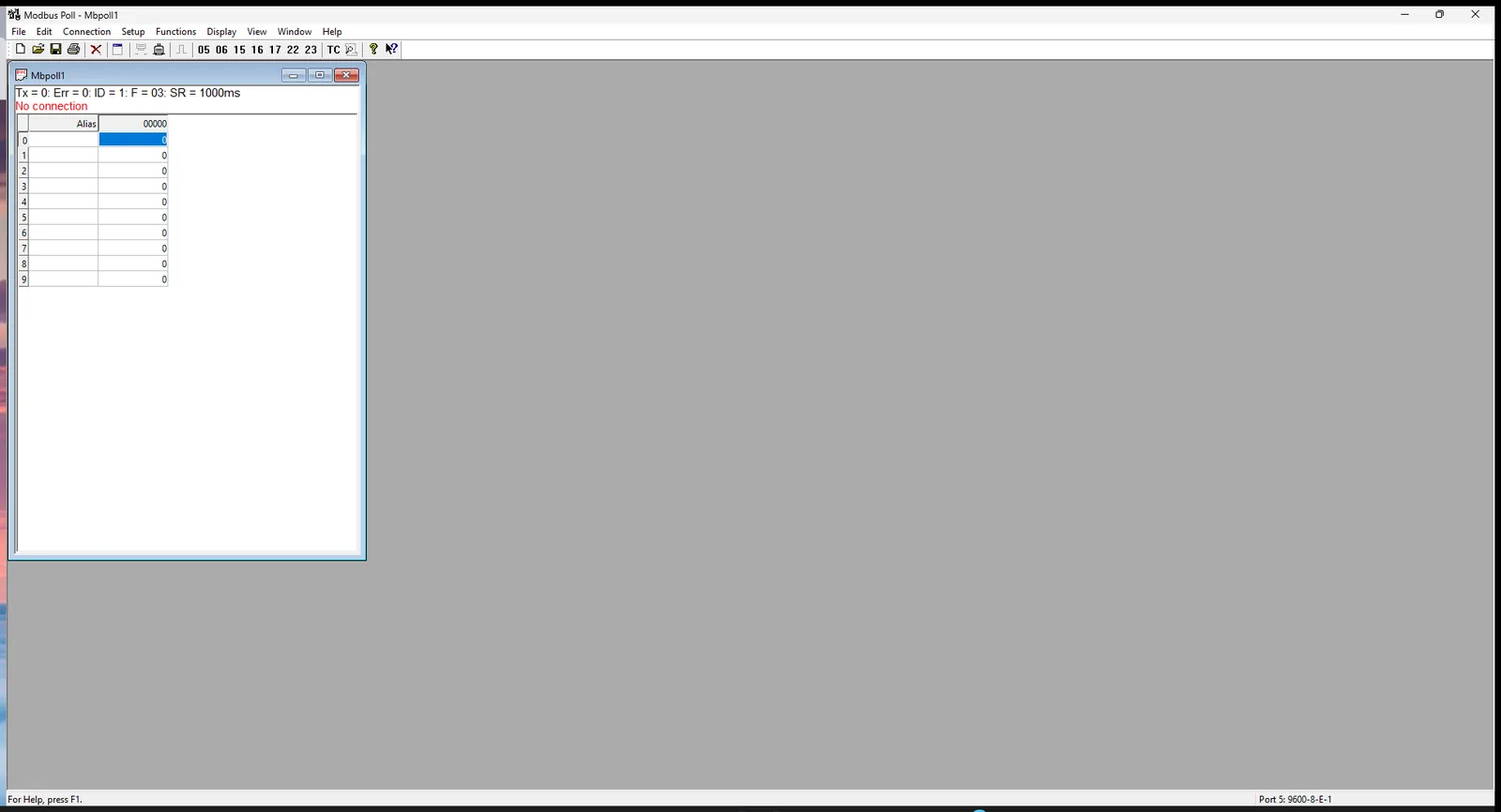
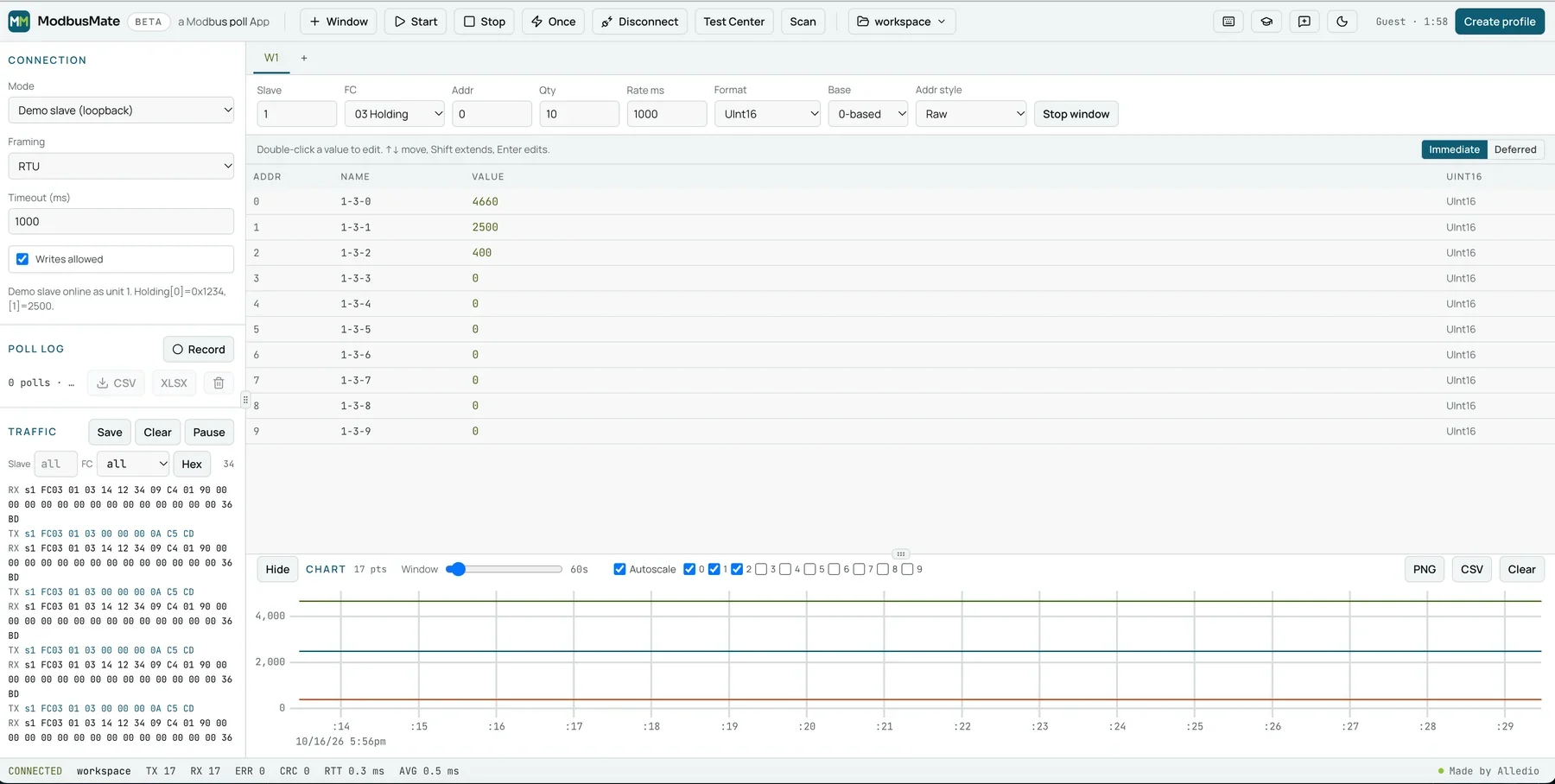
Modbus Poll keeps a classic multi-document desktop layout. ModbusMate keeps the same mental model — address base, function codes, word order — inside a browser workspace that needs no installer.
Modbus Poll price and licence
According to the Witte Software order page in November 2026, the Modbus Poll price is USD 129 each for one or two licences, USD 119 each for three to nine, and USD 109 each for ten or more. Delivery is by email. The same page states unlimited support and maintenance for the product you buy.
The licence is perpetual and single-user: one person may run the software on any number of PCs. Modbus Slave is a separate product, so a full master-plus-slave bench needs two purchases if you want both.
The trial is useful for evaluation, not for ongoing work. The official download page limits each connection to 10 minutes; after 30 days you cannot make a connection. Restarting the app starts another short demo window until that 30-day limit hits.
Platform and install
Modbus Poll ships as a Windows installer for Windows 7 through 11. That is fine on a dedicated test PC and awkward on a Mac, a Linux laptop or a locked-down company machine without admin rights. ModbusMate runs in Chrome, Edge or Opera on Windows, macOS, Linux and ChromeOS, with nothing to install and a PWA option for offline use after the first load.
Interface and setup
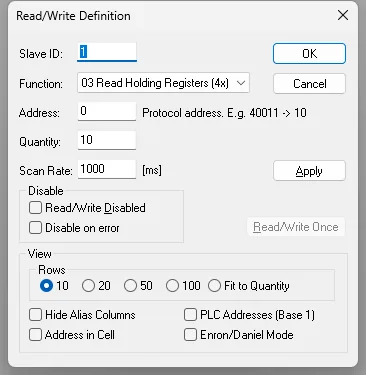
Poll’s Read/Write Definition dialog is the place you set slave ID, function code, address, quantity and scan rate. The capture below shows FC 03, address 0 and quantity 10 — the same starting point most engineers use on a new device. ModbusMate exposes those fields in each poll window and in the guided tour.
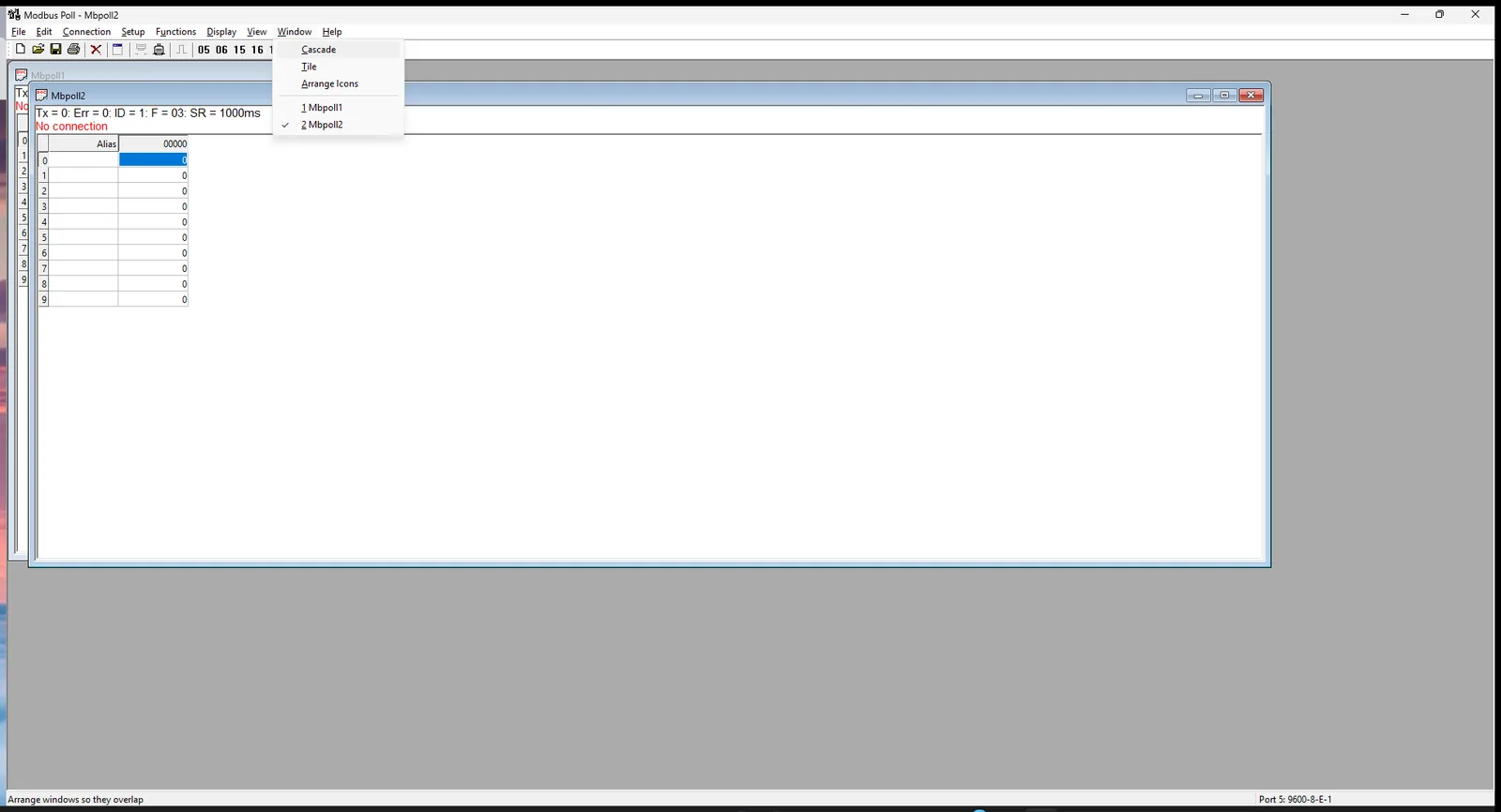
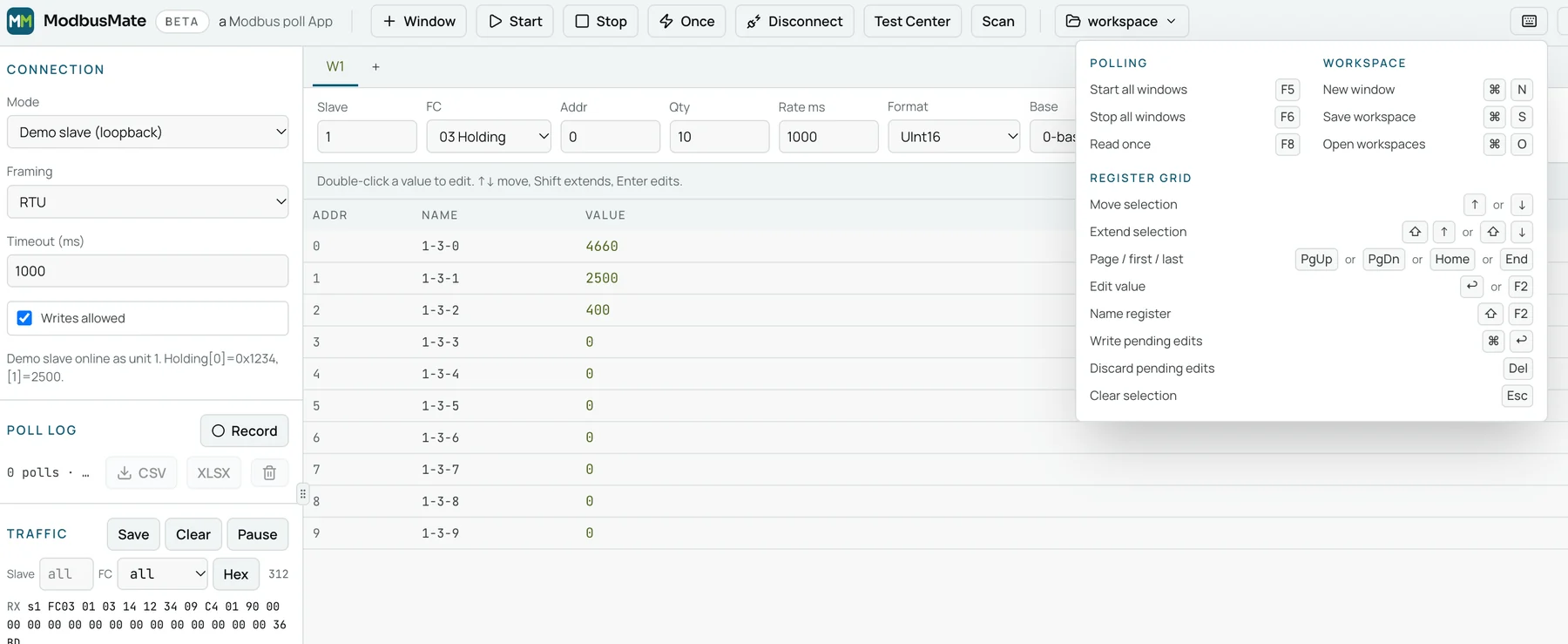
Keyboard habits transfer well. ModbusMate maps F5 / F6 / F8 to start all, stop all and read once, so a written Poll procedure still feels familiar. That makes commissioning without a mouse realistic on both tools.
Watch: ModbusMate in action
Polling several devices
Modbus Poll opens one document window per slave and data area, then tiles or cascades them. ModbusMate mirrors that with multiple poll windows and Start all / Stop all. For a multi-drop RS-485 line, both approaches let you keep one view per device without rewriting the request each time.
Data formats and word order
Poll publishes a wide set of display formats with word-order swap. ModbusMate covers Hex, Binary, ASCII, Int/UInt 16/32/64 and Float32/64 in ABCD, CDAB, BADC and DCBA, plus scaled a × raw + b. For OEM and BMS register maps that use float pairs, those four word orders matter as much as the price tag.
Logging, charts and export
Poll can log to a text file or straight into Excel, and OLE automation lets VBA drive the master. ModbusMate records a poll log to CSV or XLSX and exports charts as PNG or CSV, but it has no OLE bridge. If your acceptance test is an Excel workbook that talks to the master, Poll still wins that workflow.
Modbus RTU, ASCII and TCP
Poll speaks RTU/ASCII serial, Modbus TCP, TCP Security (TLS), UDP and RTU/ASCII over TCP/UDP. ModbusMate speaks RTU and ASCII over Web Serial today; Modbus TCP is coming soon, so do not treat TCP as available in Mate yet. Behind a TCP-to-RTU gateway you can still test the RS-485 side with Mate while you keep Poll for native TCP devices.
Support and updates
The Poll order page includes unlimited support and maintenance with the licence. ModbusMate is free, ships updates in the browser, and takes bug reports or ideas through an in-app feedback dialog. Teams that need a named vendor contract for the master itself will still prefer a paid licence.
Who should pick which
Choose Modbus Poll when you need:
- Modbus TCP, UDP or TLS today
- Excel OLE / VBA automation
- A perpetual Windows licence with vendor support on the invoice
- No browser profile and a classic desktop workflow
Choose ModbusMate when you need:
- USD 0 for every seat on the team
- macOS, Linux or ChromeOS as well as Windows
- Nothing to install on locked-down PCs
- Core RS-485 polling, formats, traffic log, chart and CSV/XLSX logging
For a broader feature map beyond price, read the live Modbus Poll alternative post. Product context sits on the ModbusMate page.
Switching from Modbus Poll: migration tips
Run both tools side by side during the 30-day Poll trial on the same device. Rebuild each Poll window as a ModbusMate poll window — slave ID, function code, start address, quantity, scan rate — then save a workspace. Keep one Poll seat if you still have TCP or OLE jobs.
FAQ
How much does Modbus Poll cost?
As of November 2026, Modbus Poll costs USD 129 per licence for one or two seats, USD 119 each for three to nine, and USD 109 each for ten or more, according to the Witte Software order page. That is a perpetual single-user licence with support and maintenance included per that page.
Is the Modbus Poll licence a subscription?
No. The published order page sells a perpetual single-user licence, not a monthly or yearly subscription. One licensed person may use it on any number of PCs.
Is there a free version of Modbus Poll?
There is a time-limited trial, not a free full product. The official download page limits a connection to 10 minutes and, after 30 days, blocks new connections. For a free daily driver on RS-485, see our Modbus Poll alternative overview.
What does ModbusMate not do that Modbus Poll does?
ModbusMate does not yet open a live Modbus TCP, UDP or TLS session (TCP is coming soon), and it has no Excel OLE automation. It also has no slave simulator for external masters. For those jobs today, keep a Modbus Poll seat or another desktop master.
Can I use ModbusMate for RS-485 RTU testing for free?
Yes. Open the app in Chrome, Edge or Opera on a desktop, connect over Web Serial, and poll RTU or ASCII devices. After five minutes as a guest, a free profile keeps your workspaces and removes the time limit.
Try ModbusMate free
Open the app on a Chromium desktop browser, try the demo slave, then plug in a USB-to-RS-485 adapter. Limits to remember: desktop Chrome/Edge/Opera, RTU/ASCII today, TCP coming soon, and a free profile after a 5-minute guest session.